How to Install
- Clean Vehicle Physics Install (must be V13, tested in V13.5 - latest as of writing this message)
- Install the core Pacejka physics
- Enable the physics simulation in your vehicle's Wheel Controllers, recommended to set the
GripandStiffnessvalues of the controllers to1
In case you improve/Enhance this script please let us know but please do not share it directly with others, only Aron can do it and he is not responsible for supporting this community-based asset
Last tested with Unity 2022.3 LTS
Known Bugs
- Sometimes, the Pacejka Visualizer crashes and freezes. You have to remove the component and add it back again to see how the WheelController's Pacejka Tire model parameters affect the tire physics in real time.
- JSON Importer/Exporter does not handle invalid chars and comments in Pacejka Tire json files, so your json must not have any
// comments.
Parameters and Usage
I tried to use as many tooltips as possible so hopefully, when you hover over the inspector values of the script you'll get up to speed.
Also, aside from the information already shared, you have to know that:
- I tried to include as many parameters as I could find
- Not every Pacejka tire model needs to have all the values set, most can be set as "0"
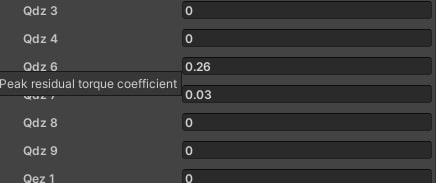
- I already have highlighted the important values by using values other than 0 or 1 - but none of them are latent in the algorithm IIRC. For example, Qdz6 is the important one to shape the Mz curve while the rest can be applied also, and Qdz 6 is the peak residual coefficient based on this source and some books.
Last point, please note that it was the Pacejka 5.2 that you replied to, the new version is a mishmash of Pacejka 5.2 and all the documents I could find for Pacejka 6.2, be aware of this in case you wanted a very seriously accurate simulation!
The Pacejka Visualizer
Okay, this is one of the highlights of my project, I have never seen it in any of the research and studies and surely anywhere, where you can "see" Pacejka forces in a graph interactively.
Important Notes
I assume researchers and professors who are into tires, may like this one a lot. Also, I am by no means a tire expert or physicist; I just read some available online sources to devise this. Therefore, if anyone who is experienced in this regard finds a critical error or even a minor mistake, I am very happy and open to learning about it and maybe fixing it.
Introductions to Pacejka/Swift Tyre forces (simplified and inaccurate)
A Pacejka tire model tries to take into account some specific forces from both the vehicle and its tire model parameters, the tire model parameters were defined and discovered by a scientist who empirically tested tires for his almost entire professional life, and then others continued to enhance and improve his findings and the tire model itself is named after him.
The issue is, that I had very limited knowledge source to the latest model the tire model and I had to simplify some of the algorithms to make it worth processing in real-time, as a result, the parameters have potentially wrong scales and I also added some additional parameters for better "feel" in Unity Vehicle Physics simulation.
Quick Remindings
So as you may know, Pacejka produces Longitudinal, Lateral, and Self-Aligning Forces, a good "normal" and real-looking example of those forces can be depicted in the graph below:
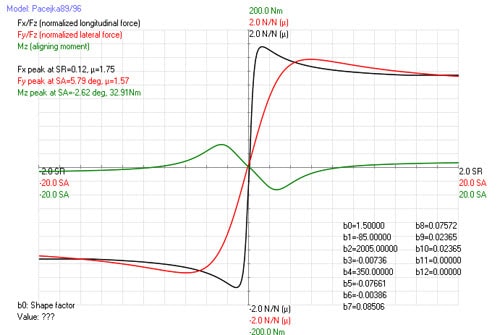
The Pacejka Visualizer Tool
So to make the tire look like it, I devised this Visualizer script. What it does is, it tries to calculate the Tire model (here it is my Pacejka/Swift Tyre version 6.2 or PAC2006 which is the latest one made in 2013 as of now)
This can help you adjust the tire parameters:

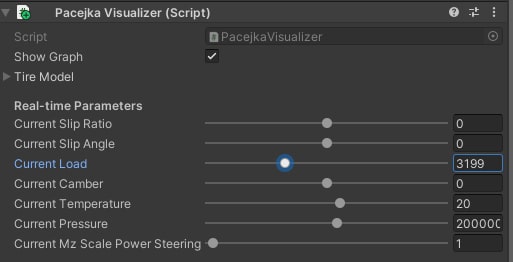
The script must be attached to a WheelController so that it can "copy" the tire model data of it. You must change the tire model parameters in the WheelController, and then use these sliders (except the current Load - which is for advanced debugging) to "see" the Pacejka forces.
Important: It is important to always remove the script and add it back if you change any of the parameters of the Wheel Controller tire model as there is a Unity bug that causes the script to stop working. You do not need to run the game to adjust these and it is in-editor only. Not always this "removing/adding" is needed.
Important: You have to set the slip ratio and slip angle to 0 and use the proper tire load (see Fz or the tire load you already set - by default it is 3200 N). And be aware that you have to focus on the red dot and not the green curves when the slip angle and ratio are not set to 0.
Tire Model Parameters
The tire model parameters have descriptions, simply hover over them to see a tooltip describing them. The most important ones have already info boxes above them, and all these parameters are grouped by the Fx Fy and Mz focuses.
You must understand that Pacejka is super complex and simply we do not have Fx Fy and Mz dependent variables, most are interconnected and they eventually affect the tire model under different tire loads, slip ratios, camber, etc.
As I said tried to read some books and content and used online tools to define the parameters and therefore I never claim it is commercial/professional/academic level. I plan to use this simplify for my own hobby project ATG Simulator tbh.